
omputers for recreational divers are the Shearwater Peregrine TX for clear, low-stress dive planning, the Garmin Descent Mk3 for smartwatch and training features, the Suunto Ocean for a modern all-rounder, and the Shearwater Perdix 2 Ti for divers who want maximum screen space and expansion.
- Quick picks by diving situation
- What matters most when choosing among the best dive computers?
- Air integration: useful information, not a substitute for gauges
- Dive modes and navigation compared
- Decompression features and future-proofing
- Wrist comfort: size, strap, and exposure protection
- Ownership realities people often overlook
- Final buying recommendation
Quick picks by diving situation
| Diver or use case | Best fit | Why it makes sense | Main compromise |
|---|---|---|---|
| First computer for regular recreational diving | Shearwater Peregrine TX | Very readable color display, simple recreational interface, air integration, and rechargeable battery | Less useful as a daily fitness smartwatch |
| Travel diver who also wants a smartwatch | Garmin Descent Mk3 | GPS, mapping, training tools, multiple dive modes, and wrist-based everyday features | More menus and settings than a dedicated recreational computer |
| One device for recreational and technical progression | Shearwater Perdix 2 Ti | Large screen, long battery life, open-circuit and closed-circuit capability, and extensive gas support | Large, expensive, and more computer than many casual divers need |
| Color-screen all-rounder with air integration | Suunto Ocean | Air integration, scuba and freediving modes, GPS activity features, and a bright AMOLED display | Battery and charging require more planning than a replaceable-battery computer |
| Minimalist recreational diving | Dedicated single-gas computer with a high-contrast display | Fewer distractions, simple operation, and often lower purchase and ownership cost | Usually lacks air integration, mapping, and advanced gas switching |
What matters most when choosing among the best dive computers?
Screen readability comes before clever features
Underwater, a screen must be readable at an angle, through a mask, in low visibility, and while you are managing a camera, line, or buoy. A large color display is easier to interpret quickly, but screen size is not the only factor. Contrast, font size, button placement, backlight behavior, and the ability to customize the main dive screen matter just as much.

Shearwater Research Peregrine Dive Computer
Included for 'Best Dive Computers for Recreational Divers' as a relevant option in this category; details come from the product listing.
View on Amazon
CRESSI Leonardo 2.0 Scuba Dive Watch, Air Nitrox Gauge, Black/Blue
Included for 'Best Dive Computers for Recreational Divers' because the listing specifies Air Nitrox Gauge and Black/Blue, details this guide uses to compare options.
View on Amazon
Mares Puck Pro EZ Wrist Underwater Scuba Dive Computer (414177) - Depth, Decompression, Temperature, Time Dive Data Display
Included for 'Best Dive Computers for Recreational Divers' because the listing specifies Depth and Decompression, details this guide uses to compare options.
View on Amazon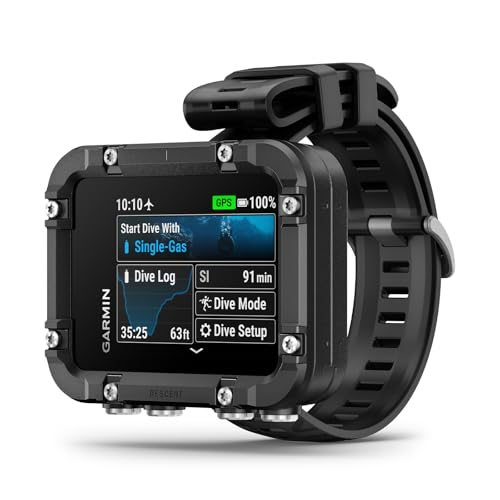
Garmin Descent™ X30, Rugged Dive Computer with Surface GPS
Included for 'Best Dive Computers for Recreational Divers' because the listing specifies Rugged Dive Computer with Surface GPS, details this guide uses to compare options.
View on AmazonThe Shearwater Peregrine TX and Perdix 2 use large, high-contrast color displays designed around dive information rather than smartwatch notifications. The Garmin Descent Mk3 and Suunto Ocean offer sharper, more modern AMOLED-style displays, but their smaller text and denser menus may require more setup. If you regularly dive in cold water or wear thick gloves, physical buttons are usually easier to operate than relying on a touch screen.
Battery type changes ownership
Rechargeable computers are convenient for frequent divers and eliminate opening the battery compartment on a trip. Their weakness is dependence on a charging cable and the gradual loss of battery capacity over several years. A replaceable lithium battery is easier to renew at a remote destination, although the compartment O-ring must be kept clean and correctly lubricated.
As a practical example, a rechargeable computer rated for about 30 to 40 hours of dive use may cover a week-long trip with several dives per day, but only if it starts fully charged. A computer using a user-replaceable battery is less dependent on charging opportunities. Check the actual dive-mode rating rather than the advertised smartwatch or standby figure.
| Computer | Approximate case/display information | Battery approach | Depth rating or intended depth | Air integration |
|---|---|---|---|---|
| Shearwater Peregrine TX | About 55 mm wide; large color LCD | Rechargeable lithium-ion battery | 120 m | Yes, with compatible transmitter |
| Shearwater Perdix 2 Ti | About 81 mm wide; large color LCD | User-replaceable AA battery | 130 m | Yes, with compatible transmitter |
| Garmin Descent Mk3 | 43 mm or 51 mm case options; color AMOLED display | Rechargeable lithium battery | 200 m | Yes, with compatible transmitter |
| Suunto Ocean | 49 mm case; AMOLED display | Rechargeable lithium battery | 100 m | Yes, with compatible transmitter |
Figures are manufacturer-rated specifications and can vary with screen brightness, temperature, GPS use, dive settings, and battery age. Depth ratings are not a recommendation to exceed your training or the limits of your planned dive.
Air integration: useful information, not a substitute for gauges
Air-integrated computers display cylinder pressure and can estimate remaining gas time when paired with a compatible transmitter. This reduces the need to bring the pressure gauge close to your face and can help you notice unusual gas consumption early.
The feature is most useful for divers who make frequent dives, use multiple cylinders, or want pressure and decompression information on one screen. It is less compelling for occasional warm-water divers who already use a simple computer and a conventional submersible pressure gauge. A transmitter adds cost, requires a compatible connection, and should be fitted with the correct high-pressure port and checked for leaks.
Do not treat an air-integration estimate as a promise of available breathing gas. Current depth, ascent rate, exertion, cylinder size, reserve pressure, and breathing pattern all affect the calculation. Keep an independent pressure check and follow your training agency’s gas-management procedures.
Dive modes and navigation compared
Recreational modes
All four leading choices support standard air and nitrox diving. Look for nitrox oxygen settings that are easy to change, a clear no-decompression display, ascent-rate warnings, safety-stop guidance, and a readable logbook. These features are more valuable to most recreational divers than a long list of specialized modes.
Freediving and multisport features
The Suunto Ocean and Garmin Descent Mk3 are attractive if one device must cover scuba, freediving, swimming, cycling, running, and general training. The Garmin adds extensive GPS and fitness functionality, while the Suunto combines dive logging with outdoor activity tools. A dedicated Shearwater computer is usually simpler underwater but does not aim to replace a full fitness watch.
Underwater navigation
GPS signals do not normally provide live positioning underwater. Dive computers use GPS before entry and after surfacing, while compass functions support underwater headings. The Garmin Descent Mk3 includes stronger mapping and navigation features for surface activities. For underwater navigation, prioritize a reliable digital compass, easy bearing adjustment, and a layout that remains legible while swimming—not a promise of underwater GPS.
Decompression features and future-proofing
For ordinary no-decompression recreational dives, the computer should make remaining no-decompression time, ascent information, and safety-stop status easy to find. More advanced computers add gas switching, decompression planning, gradient-factor options, multiple algorithm choices, and support for technical or closed-circuit diving.
The Perdix 2 Ti is the clear choice here because it is designed for divers who may progress into technical open-circuit or rebreather diving. The Peregrine TX offers a more approachable route for recreational divers who want air integration and a large display without technical complexity. The Garmin and Suunto models provide broader lifestyle features, but buying a technical computer does not replace technical training, gas planning, or supervision.
Wrist comfort: size, strap, and exposure protection
A computer that rotates around your wrist is difficult to read and easy to damage. Measure your wrist with the wetsuit or drysuit you normally wear, not only with bare skin. A wide computer may be comfortable on a drysuit but awkward on a small wrist. Conversely, a compact watch-style unit can disappear under a sleeve but may show less information at once.
- Small wrists: choose a 43–45 mm watch-style computer or use a short bungee or adjustable strap.
- Cold-water diving: make sure the strap has enough range for a thick sleeve and can be operated with gloves.
- Frequent travel: consider weight, charger size, and whether the strap can be replaced at the destination.
- Large displays: test whether the case catches on BC inflator hoses, drysuit valves, or camera equipment.
Bungee mounting is popular because it stays secure as exposure garments compress, but it may require separate attachment points or an aftermarket conversion. Standard elastic or silicone straps are easier for casual use and may be more comfortable during surface activities.
Ownership realities people often overlook
The first parts to wear are usually the strap, buckle, buttons, charging contacts, and battery seals—not the display itself. Rinse the computer and transmitter with fresh water after every saltwater dive, paying particular attention to buttons and charging contacts. Allow it to dry before charging, and do not scrape salt crystals from seals with a sharp object.
Keep software updated before a trip, but avoid installing a major update immediately before a critical dive vacation unless you have time to confirm settings and pairing. Check transmitter batteries, inspect the high-pressure connection, and verify that the computer’s time, gas mix, units, and conservatism settings are correct.
A simple cost-per-use calculation can clarify whether air integration is worthwhile. If a computer and transmitter cost about $1,000 in total and you expect 100 dives over five years, the equipment cost is approximately $10 per dive before servicing and charging. If you make only ten dives, the same setup costs about $100 per dive. Occasional divers may get better value from a simpler computer and a dependable pressure gauge.
Final buying recommendation
Choose the Shearwater Peregrine TX if your priority is the clearest dedicated recreational dive experience with air integration. Choose the Garmin Descent Mk3 if you want one wrist device for diving, navigation, and daily training. Choose the Suunto Ocean if its combination of scuba, freediving, and outdoor activity modes suits your routine. Choose the Shearwater Perdix 2 Ti when a large screen, replaceable battery, and technical expansion matter more than compactness.
Whichever model you select, buy the computer whose main dive screen you can read and operate while wearing your actual exposure protection. Features only help when they remain understandable at depth, and no computer replaces proper certification, planning, a backup pressure check, or conservative decision-making.




Write Your Review
No reviews yet. Be the first to share your experience!