
The best video doorbell for most homes in 2026 is the Ring Battery Doorbell 2K. It pairs current-generation 2K-class resolution and wide-angle framing with battery installation, so it works on a rental, a brick facade, or any door where the old chime wiring is dead or nonexistent — and it sits in the mid-range tier where features stop being compromises. If you have working low-voltage wiring and want the sharpest image on the street, the Ring Wired Doorbell 4K Pro is the premium pick and the only 4K-class option in this roundup. If you want the lowest realistic entry point without a mandatory monthly fee, the Wyze Battery Video Doorbell delivers a square 1:1 head-to-toe frame and color night vision for budget-tier money. Everyone else falls in between: the eufy E340 if you refuse subscriptions, the Aqara G410 if you live inside Apple Home, the Tapo D225 or Blink 2K+ if you want flexibility, and the Google Nest Doorbell if your smart home already speaks Google. The sections below explain exactly which trade-offs matter and which ones are marketing noise.
- Top 3 Picks
- Quick Comparison
- How We Chose
- 1. Ring Battery Doorbell 2K – Best for Most Homes
- 2. Orbitell 1080p Wireless Wi-Fi Video Doorbell – Best for the Lowest-Cost Start
- 3. Ring Wired Doorbell 4K Pro – Best for Maximum Detail
- 4. Wyze Battery Video Doorbell – Best Budget Pick
- 5. VanaOrbi 1080p WiFi Video Doorbell – Best for a Simple Wireless Setup
- 6. Aqara Smart Doorbell Camera G410 – Best for Apple Home Users
- 7. Arlo Video Doorbell 2K (2nd Gen) – Best for Wired-or-Battery Flexibility
- 8. eufy Security Video Doorbell E340 Kit – Best for Local Storage Without Subscriptions
- 9. Tapo 2K+ Wired or Battery Powered Smart Video Doorbell D225 – Best Mid-Range All-Rounder
- 10. Google Nest Doorbell (Wired, 3rd Gen) – Best for Google Home Households
- 11. Blink Battery Doorbell 2K+ – Best for Long Battery Life in Alexa Homes
- 12. Ring Battery Doorbell – Best for Head-to-Toe Coverage on a Familiar Platform
- How to Choose
Top 3 Picks
Best overall: Ring Battery Doorbell 2K. It is the safest recommendation for the widest range of homes because it needs no wiring, shoots in 2K-class resolution with a wide-angle lens, offers up to 6x Enhanced Zoom for reading faces and plates, and supports Two-Way Talk through the Ring app. The catch is that saved video requires a Ring subscription, but live view, notifications, and two-way audio work without one.
Best budget: Wyze Battery Video Doorbell. Wyze has built its reputation on giving away the features other brands charge for, and this doorbell’s 1536×1536 square sensor captures head-to-toe framing that most widescreen doorbells crop out. Color night vision, two-way audio, and a battery-powered install round out the budget-tier package.
Best premium: Ring Wired Doorbell 4K Pro. If your door already has working doorbell wiring, hardwiring buys you constant power, no recharging, and Retinal 4K resolution with 10x Enhanced Zoom — the highest detail ceiling in this list. It is the pick for anyone who wants to identify a face at the sidewalk or a license plate at the curb, and it never needs a battery swap.
Quick Comparison
The table below maps every doorbell in this roundup to the situation it fits best. Price tiers are relative bands only — listing prices move constantly, so treat “budget,” “mid-range,” and “premium” as positions on a ladder rather than fixed numbers.
| Product | Best for | Key specs | Price tier |
|---|---|---|---|
| Ring Battery Doorbell 2K | Most homes; no wiring available | 2K-class wide-angle video, up to 6x Enhanced Zoom, Two-Way Talk, rechargeable battery | Mid-range |
| Orbitell 1080p Wireless Wi-Fi Doorbell | Lowest-cost way to start | 1080p video, two-way audio, night vision, cloud storage, AI alerts, battery | Budget |
| Ring Wired Doorbell 4K Pro | Sharpest image; hardwired doors | Retinal 4K wide-angle, up to 10x Enhanced Zoom, night vision, hardwired power | Premium |
| Wyze Battery Video Doorbell | Budget buyers who want no mandatory fee | 1536×1536 1:1 head-to-toe sensor, color night vision, 2-way audio, battery | Budget |
| VanaOrbi 1080p WiFi Video Doorbell | Simple wireless setup on a tight budget | 1080p, battery powered, AI human and motion detection, 2-way talk | Budget |
| Aqara Smart Doorbell Camera G410 | Apple Home and HomeKit households | HomeKit Secure Video, bundled chime, black finish, flexible power options | Premium |
| Arlo Video Doorbell 2K (2nd Gen) | Buyers who want wired or battery in one box | 2K video, wired or battery install, kit includes a chime | Budget |
| eufy Security Video Doorbell E340 | Local storage without subscriptions | 2K FHD, built-in 8GB storage, battery kit, on-device AI | Premium |
| Tapo 2K+ Smart Video Doorbell D225 | Wired-or-battery flexibility with a chime included | 2K+ video, wired or battery powered, bundled chime | Mid-range |
| Google Nest Doorbell (Wired, 3rd Gen) | Google Home households | 2K video, wired install, live view, 2025 model, Snow finish | Premium |
| Blink Battery Doorbell 2K+ | Long battery life in Alexa homes | 2K+ video, wireless, enhanced audio, Sync Module ecosystem | Mid-range |
| Ring Battery Doorbell | Head-to-toe coverage at a lower entry point | Head-to-Toe video, Live View, Two-Way Talk, motion detection, battery | Mid-range |
How We Chose
This roundup is built from published manufacturer specifications, brand documentation, and the collective experience of the wider smart-home community — not from lab testing. We have not benchmarked, disassembled, or owned every unit here, and we say so plainly because a doorbell is a five-to-ten-year purchase that depends far more on your door than on a score.
Four criteria drove the selection. First, specification honesty: we checked whether the advertised resolution, field of view, and night-vision claims are the kind of numbers that survive contact with a real porch — a 2K sensor behind a narrow lens is less useful than a 1536×1536 square sensor that captures the full doorway. Second, category fit: every product had to answer a distinct question, whether that is “no wiring at all,” “no subscription at all,” “Apple Home only,” or “maximum detail regardless of cost.” Third, use-case match: a renter, a homeowner with a dead chime transformer, and someone covering a business entrance need different things, and we mapped picks to those situations rather than ranking them in one line. Fourth, upgrade path: a doorbell is usually the first camera in a wider system, so we favored products whose ecosystems extend sensibly to more cameras, local storage, or a chime — and we flagged the ones that lock you into a single subscription to get basic recording.
1. Ring Battery Doorbell 2K – Best for Most Homes
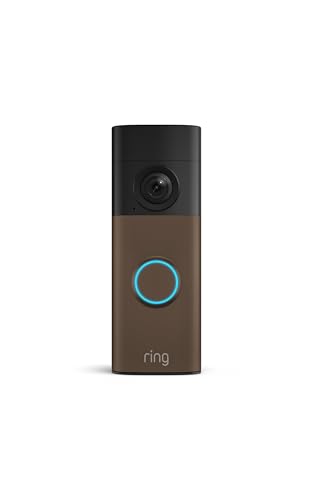
Ring Battery Doorbell 2K (newest model) Retinal 2K with wide-angle video, up to 6x Enhanced Zoom, Two-Way Talk, and Built-In Battery, Matte Mocha
Included for 'Best Video Doorbells for Home Security' because the listing specifies up to 6x Enhanced Zoom and Two-Way Talk, details this guide uses to compare options.
View on AmazonThis is the doorbell to buy if you want a current-generation camera and you cannot or will not run wires. Ring’s newest battery model carries Retinal 2K resolution through a wide-angle lens, which means the frame stays wide enough to catch a package on the step while the extra pixels let you zoom in on a face or a delivery vest. It suits renters, owners of older homes with dead chime wiring, and anyone who has already bought into Alexa and wants the doorbell to appear on an Echo Show automatically.
Key specifications
- Video: Retinal 2K resolution with a wide-angle lens
- Zoom: up to 6x Enhanced Zoom for cropping into detail after the fact
- Audio: Two-Way Talk with noise handling for outdoor conversation
- Power: rechargeable battery; no existing doorbell wiring required
- Install: adhesive or screw mounting with wedge accessories for angled views
- Detection: motion alerts with adjustable zones set in the Ring app
- Recording: cloud video history with a Ring subscription; live view and alerts work without one
- Ecosystem: Alexa integration, compatible with Ring chime accessories
- Weather: built for exposed outdoor mounting across typical four-season climates
Strengths. The 2K sensor is the headline, and it earns its place: at the distances a doorbell actually operates — three to eight feet from a visitor’s face — the jump from 1080p to 2K-class is the difference between “someone in a hoodie” and “a recognizable face.” Wide-angle framing plus Enhanced Zoom means you rarely lose the edges of the scene, which is exactly the failure mode of narrow-lens doorbells that crop out the package sitting against the wall. Installation is genuinely tool-light: charge the battery, mount the bracket, pair it in the app, and set your motion zones from the phone while standing at the door. The Ring app is also one of the most polished in the category, with fast live-view load times, per-zone sensitivity, and reliable notification delivery.
Pros
- 2K-class detail with wide-angle coverage and 6x Enhanced Zoom
- No wiring, no transformer, no electrician — ideal for rentals
- Mature app with customizable motion zones and quick live view
- Strong Alexa integration and a clear path to more Ring cameras later
Cons
- Saved video requires a paid Ring subscription; without it you get alerts and live view only
- Battery recharging means a few hours of downtime every few weeks or months, depending on traffic
- Battery drain accelerates quickly in busy locations or cold weather
- Locked into the Ring ecosystem for chimes and multi-camera management
How it compares. Against the older Ring Battery Doorbell later in this list, the 2K model is the resolution upgrade — the older unit still delivers Head-to-Toe framing and the same app experience, but with less pixel detail to work with when you zoom. Against the Tapo D225, the Ring wins on app polish and zoom range but loses on flexibility: the Tapo can run wired or on battery and ships with a chime, which matters if you want one purchase to cover both the doorbell and the indoor alert. If you already own Ring cameras, stay in the family; if you are starting fresh and want the option to hardwire later, the Tapo is worth a look.
2. Orbitell 1080p Wireless Wi-Fi Video Doorbell – Best for the Lowest-Cost Start

Orbitell 1080p Wireless Wi-Fi Video Doorbell Camera with Two Way Audio, Night Vision, Cloud Storage, Smart AI Motion Detection, Support 2.4GHz Wi-Fi only
Included for 'Best Video Doorbells for Home Security' because the listing specifies Night Vision and Cloud Storage, details this guide uses to compare options.
View on AmazonThe Orbitell is the doorbell for someone who wants to see who is at the door tonight, not next weekend, and does not want to spend mid-range money to do it. It is a straightforward 1080p wireless camera with two-way audio, night vision, cloud storage, and AI-assisted alerts. It suits first-time buyers, secondary doors, garage side entrances, and anyone who wants to test whether a doorbell camera actually changes their life before committing to a bigger ecosystem.
Key specifications
- Video: 1080p HD, the baseline resolution for the category
- Audio: two-way audio for speaking to visitors
- Night vision: infrared night vision for low-light and after-dark viewing
- Storage: cloud storage for recorded clips
- Detection: AI-assisted human and motion detection to reduce nuisance alerts
- Power: wireless, battery-operated installation
- App: mobile app for live view, playback, and notification settings
Strengths. The value proposition is simple and honest: 1080p is still enough resolution to identify a person at conversational distance in good light, and it is dramatically better than no camera at all. Wireless installation removes the single biggest barrier to entry, which is the wiring problem — most people who never buy a doorbell camera are people who discovered their chime transformer is dead. AI human detection helps here too, because a budget doorbell with crude motion sensing will notify you every time a car passes or a tree moves, and you will turn notifications off within a week. The cloud storage model means nothing to configure locally, which keeps setup short for non-technical users.
Pros
- Lowest barrier to entry of any doorbell in this roundup
- Wireless installation with no transformer or wiring work
- AI human and motion detection cuts down on false alerts
- Cloud storage means no memory card to buy or manage
Cons
- 1080p detail falls apart when you zoom into a face at more than a few feet
- Infrared night vision produces monochrome footage, not color
- Cloud storage generally depends on a subscription to keep clips beyond a trial period
- App polish and notification reliability vary more at this price point
How it compares. The nearest alternative is the VanaOrbi 1080p WiFi Video Doorbell, which matches the resolution and adds AI human and motion detection with a battery install. The difference is mostly packaging and app experience rather than hardware class — both are 1080p wireless units aimed at the same buyer. Step up to the Wyze Battery Video Doorbell and you get a genuinely better sensor: a 1536×1536 square frame and color night vision, which is a meaningful jump for a modest increase in tier. If your budget can stretch to the Wyze, stretch; if the Orbitell is what fits today, it will still do the core job of showing you who knocked.
3. Ring Wired Doorbell 4K Pro – Best for Maximum Detail

Ring Wired Doorbell 4K Pro (Newest Model), Retinal 4K with wide-angle video, 10x Enhanced Zoom, and Night Vision, Deep Silver
Included for 'Best Video Doorbells for Home Security' because the listing specifies Retinal 4K with wide-angle video and 10x Enhanced Zoom, details this guide uses to compare options.
View on AmazonThis is the doorbell for people who care about identifying, not just seeing. Retinal 4K resolution through a wide-angle lens, up to 10x Enhanced Zoom, and night vision make it the detail ceiling of this roundup. It suits homeowners with working doorbell wiring, small business entrances, and anyone whose porch is far enough from the street that faces arrive small in the frame. It is the only product here that justifies the premium tier on image quality alone.
Key specifications
- Video: Retinal 4K resolution with a wide-angle lens
- Zoom: up to 10x Enhanced Zoom, the highest in this roundup
- Night vision: dedicated low-light imaging for after-dark identification
- Power: hardwired to existing doorbell wiring — no battery, no recharging
- Audio: two-way talk through the Ring app
- Detection: motion zones and alerts configured in the Ring app
- Recording: cloud video history with a Ring subscription
- Ecosystem: Alexa integration and the wider Ring camera family
Strengths. Hardwiring is the underrated feature. A wired doorbell never goes offline for a recharge, never degrades in cold weather the way lithium batteries do, and can support continuous or near-continuous recording modes that a battery unit cannot sustain without dying in days. The 4K sensor then does something genuinely useful: at 10x zoom on a 4K frame, you have enough pixel density to read a license plate at the curb or identify a face at the sidewalk — feats that are pure wishful thinking on a 1080p feed. Ring’s app handles the increased data without feeling sluggish, and the same subscription that covers this doorbell covers your other Ring cameras, so the cost per camera drops as your system grows.
Pros
- Highest resolution and zoom in this roundup by a wide margin
- Hardwired power means no recharging and no cold-weather battery loss
- Strong night vision and reliable app performance
- One subscription can cover an entire Ring camera system
Cons
- Requires working doorbell wiring and adequate transformer output
- Premium tier pricing, and the subscription is effectively mandatory for recording
- 4K footage consumes more cloud storage and more upload bandwidth
- Installation is a real electrical job compared with adhesive mounting
How it compares. Against the Ring Battery Doorbell 2K, this is a straight trade of convenience for fidelity: the battery model installs anywhere and the wired model sees everything, but only where wiring exists. Against the Google Nest Doorbell (Wired, 3rd Gen), the Ring edges ahead on zoom range and raw resolution while the Nest is the better fit if your household runs on Google Assistant and you want the doorbell to announce visitors on Nest displays. If you have wiring and you want the single sharpest picture, this is the one.
4. Wyze Battery Video Doorbell – Best Budget Pick

Wyze Battery Video Doorbell Wireless Camera, 1536x1536 HD+ with Color Night Vision, 2-Way Audio, 1:1 Head-to-Toe View, Person/Vehicle/Package Monitor, Wire-Free/Wired Option, 1 Minute Easy Setup
Included for 'Best Video Doorbells for Home Security' because the listing specifies 1536x1536 HD+ with Color Night Vision and 2-Way Audio, details this guide uses to compare options.
View on AmazonWyze has spent years making the case that you should not have to pay a subscription to use hardware you already own, and this doorbell is that argument in product form. Its 1536×1536 sensor is square rather than widescreen, which produces a 1:1 head-to-toe view — you see the visitor’s face and the package at their feet in the same frame. It suits budget buyers, renters, and anyone who wants a competent doorbell without an ongoing monthly bill.
Key specifications
- Video: 1536×1536 HD+ with a 1:1 head-to-toe aspect ratio
- Night vision: color night vision, not just infrared monochrome
- Audio: two-way audio
- Power: wireless, battery-operated
- Detection: motion and person alerts handled on the device and in the app
- Storage: local storage options plus optional cloud plans
- App: Wyze app for live view, playback, and automation
Strengths. The square sensor is the smartest design decision in this entire roundup. Traditional 16:9 doorbells crop the top and bottom of the doorway, which means a tall visitor’s face or a low package can fall outside the frame. A 1:1 sensor captures the whole vertical doorway, and because the resolution is 1536 pixels on each axis rather than 1920×1080, the effective detail on a face is competitive with much more expensive widescreen cameras. Color night vision is a second real advantage — a porch light plus color night vision produces footage where you can distinguish a blue jacket from a black one, which infrared cannot do. And critically, Wyze’s model means the camera does useful work even if you never subscribe.
Pros
- Square 1:1 head-to-toe framing catches faces and packages together
- Color night vision is a genuine step above infrared-only competitors
- Budget-tier pricing with no mandatory subscription for basic function
- Local storage options reduce long-term cost of ownership
Cons
- 1536×1536 is below 2K-class detail when you zoom hard
- The app is functional but less refined than Ring, Google, or Arlo
- Battery recharging downtime, same as any wireless unit
- Fewer premium integrations than the major ecosystems
How it compares. Against the Orbitell 1080p and VanaOrbi 1080p, the Wyze wins on sensor design and night vision — the square frame and color imaging are not marketing flourishes, they change what you can actually see. Against the Ring Battery Doorbell 2K, it trades raw resolution and app polish for a head-to-toe aspect ratio and a much friendlier stance on subscriptions. If ongoing fees are the thing you hate most about smart home gear, the Wyze is the better buy despite the lower pixel count.
5. VanaOrbi 1080p WiFi Video Doorbell – Best for a Simple Wireless Setup
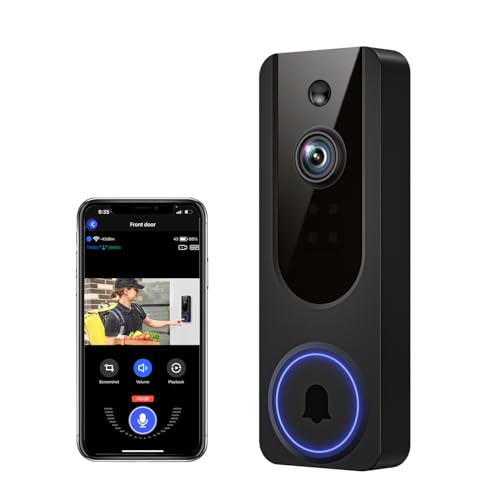
VanaOrbi 1080p WiFi Video Doorbell Camera Wireless, Battery Powered, AI Human and Motion Detection, 2 Way Talk, Night Vision, Cloud Storage, 2.4G WiFi Only, Indoor/Outdoor Surveillance
Included for 'Best Video Doorbells for Home Security' because the listing specifies Battery Powered and AI Human and Motion Detection, details this guide uses to compare options.
View on AmazonThe VanaOrbi is a no-frills 1080p wireless doorbell with AI human and motion detection and two-way talk. It exists to solve one problem: getting a camera on your door with as little friction and cost as possible. It suits renters, people covering a back door or side gate, and buyers who want a second camera without paying mid-range prices for it.
Key specifications
- Video: 1080p HD
- Detection: AI human and motion detection to filter out non-human movement
- Audio: 2-way talk
- Power: battery powered, fully wireless
- Storage: cloud storage for clips
- App: mobile app with live view and alert controls
Strengths. Human detection at a budget price is the standout. Cheap motion sensors trigger on every passing car, every swaying branch, and every change in light — which trains owners to ignore notifications entirely, defeating the purpose. AI human detection narrows alerts to actual people, which is what you actually want to know about. The wireless install means you can move the doorbell to a different door in ten minutes if your first placement turns out to be wrong, and that flexibility is worth more than most spec sheets admit. For a secondary entrance that does not justify a premium camera, this is a sensible, low-risk purchase.
Pros
- AI human detection at a budget-tier price
- Fully wireless, so placement can change on a whim
- Two-way talk for deliveries and visitors
- Low financial risk for a secondary door or trial install
Cons
- 1080p resolution limits how much you can zoom into a face
- Cloud storage typically requires a subscription for retained clips
- App quality is a step below the major brands
- No local storage option, so an internet outage means no recording
How it compares. The closest product in this list is the Orbitell 1080p Wireless, which shares the resolution, wireless power, and AI detection profile. Choosing between them comes down to app feel and whatever price is on the page that week, because the hardware class is identical. The Wyze Battery Video Doorbell is the better camera for a modest step up, but the VanaOrbi’s real competition is inertia — it is cheap and easy enough that the “I’ll get around to it” excuse disappears.
6. Aqara Smart Doorbell Camera G410 – Best for Apple Home Users

Aqara Smart Doorbell Camera G410 with Chime, HomeKit Secure Video, Black
Included for 'Best Video Doorbells for Home Security' because the listing specifies HomeKit Secure Video and Black, details this guide uses to compare options.
View on AmazonIf your household runs on Apple Home, this is the doorbell that fits without compromise. The G410 supports HomeKit Secure Video and ships with a chime in the box, and it comes in a black finish that suits darker doors and trim. It suits Apple-centric homes, privacy-conscious buyers, and anyone who wants video handled inside an ecosystem they already trust rather than through a separate manufacturer app.
Key specifications
- Platform: HomeKit Secure Video support, viewable in the Apple Home app
- Included accessory: a chime for indoor alerts
- Finish: black
- Power: flexible installation options
- Detection: person, package, and motion-style events surfaced through the Home app
- Ecosystem: integrates with Aqara sensors, hubs, and automations
- Privacy: footage processed within the Apple ecosystem when HomeKit Secure Video is enabled
Strengths. HomeKit Secure Video is the reason to buy this doorbell. It routes video through Apple’s infrastructure with end-to-end encryption, stores clips against your iCloud plan rather than a separate camera subscription, and surfaces everything in the same Home app you already use for lights and locks. That consolidation matters more than any single spec — a doorbell that lives in a separate app gets checked less often. The bundled chime is a practical inclusion, since most homes need an indoor alert and buying one separately is an annoying extra purchase. Aqara’s broader ecosystem is also a genuine advantage if you already use their sensors and hubs, because the doorbell can trigger automations rather than just record.
Pros
- Native HomeKit Secure Video support with encrypted storage
- Chime included, so no separate accessory purchase
- Deep integration with the Apple Home app and Aqara automations
- Black finish that blends with dark doors and trim
Cons
- Premium-tier pricing for a product that is less useful outside Apple homes
- HomeKit Secure Video storage depends on your iCloud plan tier
- Feature set is narrower than Ring or Google for non-Apple users
- Fewer third-party integrations than the largest ecosystems
How it compares. Against the Google Nest Doorbell (Wired, 3rd Gen), the choice is entirely about which assistant runs your house — Aqara for Apple, Nest for Google, and neither is meaningfully better in isolation. Against the Ring Battery Doorbell 2K, the Aqara trades a bit of raw resolution and zoom range for encrypted local-ecosystem storage and an included chime. If you are an iPhone household, the Aqara is the more coherent purchase; if you are not, its main advantage evaporates.
7. Arlo Video Doorbell 2K (2nd Gen) – Best for Wired-or-Battery Flexibility

Arlo Video Doorbell 2K (2nd Gen) Wireless or Wired - 1-Cam + Chime
Included for 'Best Video Doorbells for Home Security' because the listing specifies 1-Cam + Chime, details this guide uses to compare options.
View on AmazonThis is the doorbell for people who do not yet know how they want to power it. The Arlo 2K (2nd Gen) can run on existing doorbell wiring or on battery, and the kit includes a chime. That dual-path design makes it a smart choice for a home where the wiring situation is uncertain, for someone planning a renovation, or for a buyer who wants to start wireless and hardwire later without replacing hardware.
Key specifications
- Video: 2K resolution
- Power: wired to existing doorbell wiring or battery powered, your choice
- Included accessory: chime in the kit
- Audio: two-way talk
- Detection: motion and person alerts with activity zones
- Storage: cloud recording plans plus local storage options through Arlo base stations
- App: Arlo app for live view, recordings, and notifications
Strengths. Flexibility is the entire pitch, and it is a real one. Wiring a doorbell is the step where most projects stall — either the transformer is undersized, the chime wiring is corroded, or the run is impractical. With this Arlo you can mount it on battery today and revisit hardwiring when it suits you, and if you do wire it, you gain the reliability benefits of constant power without buying a second camera. The 2K sensor is a legitimate step above 1080p, and the included chime means a complete, working setup out of one box rather than three separate purchases. Arlo’s app is mature and handles multiple cameras well, which matters if this is your first step into a larger system.
Pros
- Wired or battery installation from the same unit
- 2K resolution with a chime included in the kit
- Strong app and a clear upgrade path to more Arlo cameras
- Local storage possible with Arlo base station hardware
Cons
- Cloud recording requires a subscription; local storage requires additional hardware
- Budget-tier pricing often means budget-tier accessories and mounting hardware
- Battery mode loses the continuous-recording benefits of wired power
- Fewer bundled smart-home integrations than Ring or Google
How it compares. The Tapo D225 is the direct competitor here — both are wired-or-battery doorbells that ship with a chime, and both target buyers who want options. The Arlo leans on app maturity and a broader camera ecosystem; the Tapo leans on value and its own well-regarded local recording approach. Against the Ring Battery Doorbell 2K, the Arlo’s advantage is the option to hardwire at all, which Ring’s battery model does not offer.
8. eufy Security Video Doorbell E340 Kit – Best for Local Storage Without Subscriptions

eufy Security Video Doorbell E340 Kit with Battery, 2K FHD, Built-in 8GB
Included for 'Best Video Doorbells for Home Security' because the listing specifies 2K FHD and Built-in 8GB, details this guide uses to compare options.
View on AmazonThis is the doorbell for people who are done renting their own footage. The eufy E340 kit includes a battery and 2K FHD video with built-in 8GB of local storage, which means clips live on the device rather than on someone else’s server. It suits subscription-averse buyers, privacy-focused households, and anyone who has already paid three years of cloud fees and done the math.
Key specifications
- Video: 2K FHD resolution
- Storage: built-in 8GB local storage, no subscription required for recording
- Power: battery kit included
- Audio: two-way talk
- Detection: on-device AI for human and motion events
- App: eufy Security app for live view and local playback
- Ecosystem: expandable to other eufy cameras and local storage hubs
Strengths. Eight gigabytes sounds modest until you do the arithmetic, and the arithmetic is favorable. A doorbell records in short bursts — typically 15 to 30 seconds per event — so a home with 40 events a day at 20 seconds each generates roughly 13 minutes of footage daily. At 2K, that is on the order of 100 to 200 megabytes per day depending on compression and motion complexity, which puts 8GB of storage somewhere in the one-to-two-month retention range before the oldest clips rotate out. That is more history than most people ever review, and it costs nothing per month. On-device AI means person detection happens without uploading everything first, and because there is no subscription, the total cost of ownership is effectively fixed at purchase.
Pros
- Built-in 8GB local storage with no subscription for recording
- 2K FHD video with on-device human and motion detection
- Battery kit included, so no hidden accessory cost
- Predictable lifetime cost and better privacy posture
Cons
- Premium-tier price up front, even though it saves money over time
- 8GB fills quickly in high-traffic locations or with long clip lengths
- Local storage is vulnerable if the device itself is stolen or damaged
- Smaller ecosystem than Ring or Google for integrations
How it compares. Against the Ring Battery Doorbell 2K, the eufy is the anti-subscription choice: similar resolution class, very different ownership economics. Against the Wyze Battery Video Doorbell, the eufy costs more but adds built-in storage and a more polished app, while the Wyze counters with its square head-to-toe sensor and color night vision. If you plan to keep the doorbell five years and you hate monthly bills, the eufy’s up-front premium pays itself back.
9. Tapo 2K+ Wired or Battery Powered Smart Video Doorbell D225 – Best Mid-Range All-Rounder

Tapo 2K+ Wired or Battery Powered Smart Video Doorbell with Chime, D225
Included for 'Best Video Doorbells for Home Security' because the listing specifies D225, details this guide uses to compare options.
View on AmazonThe Tapo D225 is the doorbell that refuses to make you choose. It runs on existing wiring or on battery, ships with a chime, and delivers 2K+ resolution at a mid-range tier. It suits buyers who want flexibility, a complete out-of-box setup, and the option of local recording without committing to a premium price or a single ecosystem.
Key specifications
- Video: 2K+ resolution, above standard 2K
- Power: wired or battery powered
- Included accessory: chime
- Detection: motion and person alerts with activity zones
- Storage: local microSD-style recording options plus cloud plans
- Audio: two-way talk
- App: Tapo app with live view, playback, and automation
Strengths. The combination of wired-or-battery power, an included chime, and local storage options is unusually complete for the tier. Most doorbells make you pick two of those three. The 2K+ sensor is a genuine notch above standard 2K, which shows up in zoom detail rather than in day-to-day viewing — exactly where extra pixels matter. Local recording is the quiet killer feature: a memory card costs very little, holds weeks of event clips, and removes the subscription question entirely for buyers who simply want footage on their own terms. Tapo’s app has matured considerably and now handles multiple cameras, zones, and schedules without the rough edges that budget apps used to have.
Pros
- Wired or battery installation with a chime included
- 2K+ resolution and local recording options
- No mandatory subscription to keep your footage
- Mature app with multi-camera support
Cons
- Mid-range pricing that creeps toward premium territory
- Local recording requires buying and managing a memory card
- Ecosystem integrations are narrower than Ring, Google, or Apple
- Battery mode still means periodic recharging
How it compares. The Arlo Video Doorbell 2K (2nd Gen) matches the wired-or-battery flexibility and included chime, so the split comes down to local storage and price tier — the Tapo generally wins on both. Against the Ring Battery Doorbell 2K, the Tapo offers more installation flexibility and the option to avoid subscriptions, while Ring counters with a more polished app and a deeper ecosystem. If you want one purchase that covers power, alerts, and storage without a monthly fee, the Tapo is the most complete mid-range answer here.
10. Google Nest Doorbell (Wired, 3rd Gen) – Best for Google Home Households

Google Nest Doorbell (Wired, 3rd Gen) - 2K Video, Live View - 2025 - Snow
Included for 'Best Video Doorbells for Home Security' because the listing specifies 3rd Gen) and 2K Video, details this guide uses to compare options.
View on AmazonThis is the doorbell for a home that already talks to Google. The wired 3rd-generation Nest Doorbell shoots 2K video, supports live view, and integrates natively with Google Home, so visitors can be announced on Nest displays and speakers the moment they press the button. It suits Android households, Google Home users, and anyone who wants the doorbell to be part of a broader smart-home routine rather than a standalone app.
Key specifications
- Video: 2K resolution
- Power: wired installation to existing doorbell wiring
- Finish: Snow (white)
- Model year: 2025
- Live view: on-demand streaming through the Google Home app
- Detection: person, package, and motion alerts with customizable zones
- Ecosystem: native Google Home integration, announcements on Nest displays and speakers
Strengths. Integration is where Nest has always won, and it still does. When someone rings, the doorbell can push an announcement to a Nest Hub in the kitchen and show the live feed without you touching a phone — a genuinely better experience than opening an app. The wired power means no battery anxiety, no cold-weather dropouts, and the ability to capture more events per day without draining anything. 2K resolution is plenty for a porch, and Google’s person and package detection has become reliably accurate, which matters because a doorbell that cries wolf gets muted. The white Snow finish also blends into light-colored trim better than the black housings most competitors favor.
Pros
- Best-in-class Google Home integration with display announcements
- 2K video with reliable person and package detection
- Wired power means no recharging and no battery degradation
- Clean, unobtrusive Snow finish
Cons
- Requires working doorbell wiring; no battery option
- Premium-tier pricing, and extended video history needs a subscription
- Limited value outside the Google ecosystem
- Fewer zoom features than the Ring Wired 4K Pro
How it compares. Against the Ring Wired Doorbell 4K Pro, the Nest loses on raw resolution and zoom range but wins on how the doorbell behaves in daily life — announcements on displays beat notifications on a phone. Against the Aqara Smart Doorbell Camera G410, it is the same fork in the road: Google versus Apple, with almost no reason to pick the wrong side. If your home runs on Google, buy this one and do not overthink it.
11. Blink Battery Doorbell 2K+ – Best for Long Battery Life in Alexa Homes

Blink Battery Doorbell 2K+ (newest model) — Wireless video doorbell, 2K video resolution, enhanced audio. Sync Module Core included – System (Black)
Included for 'Best Video Doorbells for Home Security' because the listing specifies 2K video resolution and enhanced audio. Sync Module Core included, details this guide uses to compare options.
View on AmazonBlink built its reputation on battery cameras that run for months rather than weeks, and the newest Battery Doorbell 2K+ applies that philosophy to the front door. It delivers 2K+ video with enhanced audio, runs wirelessly, and slots into the Blink Sync Module ecosystem for local storage. It suits Alexa households, people with hard-to-wire doors, and anyone who finds recharging a doorbell every few weeks intolerable.
Key specifications
- Video: 2K+ resolution
- Audio: enhanced audio for clearer two-way conversation
- Power: wireless, battery operated
- Ecosystem: works with Blink Sync Module hardware for local clip storage
- Detection: motion alerts with customizable zones and sensitivity
- Integration: Alexa-compatible for live view on Echo displays
- App: Blink app for live view, clips, and settings
Strengths. Battery endurance is the headline, and Blink’s power-management approach is genuinely conservative in a way that extends time between charges — the trade-off is that the camera is more event-driven than continuous, which is exactly the right behavior for a battery doorbell. Adding a Sync Module turns local USB storage into an option, which means you can keep weeks of clips without a subscription. 2K+ resolution is a solid step above 1080p and matches or slightly exceeds most mid-range competitors. For Alexa users, the integration is clean: ask a nearby Echo to show the front door and the feed appears, and announcements on ring work without extra configuration.
Pros
- Long battery life relative to typical wireless doorbells
- 2K+ video with enhanced audio
- Local storage possible with Sync Module hardware
- Strong Alexa integration with display live view
Cons
- Local storage requires buying Sync Module hardware separately
- Event-driven recording means fewer continuous-capture options
- Feature depth lags Ring and Google at the same tier
- No wired option for buyers who want constant power
How it compares. Against the Ring Battery Doorbell 2K, the Blink wins on battery endurance and local storage potential while Ring wins on app polish, zoom features, and ecosystem breadth. Against the Tapo D225, the Blink gives up the wired-or-battery flexibility in exchange for longer wireless runtime. If you are an Alexa household that wants to charge the doorbell twice a year instead of every month, this is the pick.
12. Ring Battery Doorbell – Best for Head-to-Toe Coverage on a Familiar Platform
This is the Ring doorbell for buyers who want the head-to-toe view without paying for the newest 2K model. It captures full-height video from the doorstep to the visitor’s head, supports Live View with Two-Way Talk, and delivers motion detection through the Ring app. It suits homes where the frame matters more than the pixel count, and buyers already invested in Ring accessories who want a lower-cost addition.
Key specifications
- Video: Head-to-Toe framing that captures the full doorway vertically
- Live view: on-demand streaming in the Ring app
- Audio: Two-Way Talk
- Detection: motion detection with adjustable zones and sensitivity
- Power: battery operated, no wiring required
- Ecosystem: Ring app, Alexa integration, Ring chime compatibility
- Recording: cloud video history with a Ring subscription
Strengths. Head-to-Toe framing solves the most common complaint about doorbell cameras — missing the package on the step or the top of a tall visitor’s head. By orienting the frame vertically, this model captures the entire doorway in one shot, which is more useful than a slightly sharper widescreen crop that cuts off both ends. The Ring app remains the benchmark for reliability: notifications arrive, live view loads quickly, and motion zones are easy to tune so your phone is not buzzing at every passing car. Battery installation keeps it flexible, and if you already own Ring cameras or chimes, adding this one costs nothing extra in setup effort.
Pros
- Head-to-Toe framing captures the whole doorway, package included
- Reliable Ring app with fast live view and tunable zones
- Battery installation works on any door
- Seamless addition to an existing Ring setup
Cons
- Lower resolution than the newer Ring Battery Doorbell 2K
- Cloud recording requires a Ring subscription
- Battery recharging downtime, with cold-weather drain
- Less zoom detail for distant subjects
How it compares. This is the direct predecessor to the Ring Battery Doorbell 2K at the top of this list. Both share Head-to-Toe-style framing, the Ring app, Two-Way Talk, and battery power; the 2K model adds resolution and up to 6x Enhanced Zoom on top. If you rarely need to zoom and you would rather save money, this remains a perfectly good doorbell. Against the Wyze Battery Video Doorbell, Ring wins on app quality and ecosystem while Wyze wins on the square sensor and its subscription-free posture.
How to Choose
The right doorbell is determined by four things in this order: whether you can wire it, what you need to see, how you feel about subscriptions, and how exposed your porch is. Resolution is fourth on that list, not first, despite being the number every listing shouts about.
Wired versus battery: start with the transformer, not the camera
Battery doorbells install with adhesive or two screws and work on any door, including rentals where you cannot modify anything. The cost is downtime — you will take the unit down to charge it, typically every few weeks in a busy entryway and every few months on a quiet one — plus reduced performance in sustained cold, where lithium cells lose capacity and event capture slows. Wired doorbells need a working transformer, usually 16 to 24 volts AC, and a functioning chime circuit. If you do not know whether yours works, that is the first thing to test: touch a multimeter to the two wires behind your existing button. If you read voltage, you can hardwire. If you read nothing, you can either replace the transformer or simply buy a battery model and skip the electrical work entirely. Wired wins on reliability, continuous capture, and never thinking about charging again. Battery wins on universality and renter-friendliness. If you are unsure, buy a wired-or-battery model so the decision stays open.
Resolution: what the numbers actually mean at porch distance
A doorbell sits three to eight feet from a visitor’s face, which is close. That means the practical difference between 1080p and 2K is mostly about zoom — cropping into the frame after the fact to read a face, a vest, or a plate. The table below puts the common resolution classes side by side, along with the field-of-view trade-offs that matter just as much.
| Resolution class | Typical pixel dimensions | Practical benefit | Where it struggles |
|---|---|---|---|
| 1080p HD | 1920 x 1080 | Identifies a person at conversational distance in daylight | Faces go soft when zoomed; distant plates unreadable |
| 1536 x 1536 (1:1) | 1536 x 1536 | Full head-to-toe doorway in one frame; strong vertical coverage | Wider horizontal scenes lose edge detail |
| 2K class | ~2560 x 1440 | Readable faces at several feet; usable 4x-6x zoom | Heavy zoom still softens; larger files |
| 2K+ / 4MP class | ~2560 x 1520 and up | Marginally better zoom headroom than standard 2K | Diminishing returns for most porches |
| 4K class | ~3840 x 2160 | Face and plate identification at street distance; 10x zoom | Storage, bandwidth, and price all rise sharply |
Field of view matters as much as pixels. A very wide lens, often quoted around 160 degrees, shows more of the street but stretches faces at the edges. A narrower lens around 120 to 140 degrees keeps faces truer but may crop a package sitting against the wall. The honest answer is that a vertical or square aspect ratio beats a wide one for a doorway, because doorways are tall and visitors stand upright.
Night vision, detection zones, and the alert problem
Infrared night vision produces black-and-white footage with bright, ghostly eyes; color night vision uses a small amount of ambient light to keep color, which helps distinguish clothing, vehicle color, and whether someone is holding a package. Both work, but color night vision is meaningfully more useful for identification. On detection, look for two capabilities: adjustable activity zones, so you can mask out the sidewalk and the tree, and person detection, so passing cars do not trigger alerts. Without both, you will mute notifications within a week, and a muted doorbell is a useless doorbell. Sensitivity tuning is worth the ten minutes it takes — most false-alert complaints are configuration problems, not hardware problems.
Subscriptions versus local storage: the five-year math
This is where doorbells quietly cost the most. A single-camera cloud plan typically runs somewhere in the range of a few dollars per month, and multi-camera plans land in the low teens. Over five years, a single-camera plan in the $3 to $6 per month band totals roughly $180 to $360; a multi-camera plan at $10 to $15 per month totals $600 to $900. Compare that with local storage: a memory card or built-in storage adds nothing per month, and a Sync Module or base station is a one-time purchase. The trade-off is real — local storage can be destroyed along with the device in a burglary, and cloud footage survives that. The sensible middle ground is a doorbell with local storage for daily use plus a cheap cloud plan only if your situation justifies offsite backup. If you are buying for a rental, budget the subscription into the decision from day one rather than discovering it later.
App quality, weather resistance, and what wears out first
App quality is the feature you touch every day, and it is the hardest to judge from a spec sheet. Look for fast live-view load times, playback that scrubs without buffering, and notification delivery you can trust. A doorbell with excellent hardware and a sluggish app will frustrate you more than a modest camera with a great one. On weather resistance, check the IP rating — IP65 handles rain and dust, IP66 adds protection against stronger water jets, and anything below IP54 should not be mounted fully exposed. Operating temperature ranges matter if you live somewhere with real winters; battery models suffer most, sometimes refusing to charge below freezing, while wired units keep working. As for what wears out: the battery is the first consumable, losing capacity after a few hundred cycles. Next is the rubber gasket and lens seal, which hardens and can let in moisture after two to four years. Third is the adhesive or mounting plate, which can loosen with thermal cycling. Cleaning is simple — a microfiber cloth and a little water on the lens, never solvents — and doing it every few months prevents the hazy, low-contrast footage that owners often mistake for a failing sensor.
Decision matrix: match the doorbell to your situation
| Your situation | What matters most | Recommended pick |
|---|---|---|
| Renting; cannot modify anything | Adhesive mount, no wiring, easy removal | Ring Battery Doorbell 2K or Wyze Battery Video Doorbell |
| Working doorbell wiring already present | Continuous power, no recharging, max detail | Ring Wired Doorbell 4K Pro or Google Nest Doorbell (Wired, 3rd Gen) |
| Apple Home household | HomeKit Secure Video, Home app integration | Aqara Smart Doorbell Camera G
Explore Our Guides & Free Tools
20 Google AI Products Explained: Full List 202620 Google AI Products Explained: Full List 2026 Google’s AI lineup in... 
Best Xbox Series X DealsThe best Xbox Series X deal in 2026 is usually the 1TB... 
Best Black Friday Instant Pot DealsThe best Black Friday Instant Pot deal for most households is the... 
Best Refrigerator DealsTop 3 Picks The best refrigerator deal overall for most households is... 
Best Keurig Deals: Top PicksTop 3 Picks Best overall: The Keurig K-Elite is the pick for... 
Best Deal on a Side-by-Side RefrigeratorWhat Is the Best Deal on a Side-by-Side Refrigerator in 2026? The... 
Best Cyber Monday NBA 2K DealsBest Cyber Monday NBA 2K Deals: Which Edition Actually Pays Off? The... 
Best Black Friday PS5 Game DealsBest Black Friday PS5 Game Deals: The Complete 2026 Buyer’s Guide The... 
Best AMD Ryzen Laptop DealsTop 3 Picks The best overall AMD Ryzen laptop deal for most... 
Best Zwilling Kramer Euroline Damascus Knife CollectionsTop 3 Picks Best overall: The KRAMER by ZWILLING EUROLINE Damascus 10-inch... Top pickBest value on Amazon
Check Price →
|
Write Your Review
No reviews yet. Be the first to share your experience!